Your semester, on one screen.

One free Mac app for USYD, UTS and ANU students. Your Canvas token never leaves your laptop.

UniOne runs on your Mac. The iPhone app is coming soon.

Download for Mac

Apple silicon · macOS 13 or later · free

See what it does
iPhone · coming soon
Sample semesterThe date, the week and the countdown run on your clock.

It's 11pm. You need to know what's due tomorrow, which slides you skipped, what you need on the final, and if you can still get an extension.

UniOne has already read Canvas, your timetable and your notes. The answer is one glance away, not four tabs and a unit outline.

Open it and know what's next.

Today opens on one line that says what matters now, then answers four questions in order: what's next, what's due, what to revise and what changed. A class in the next 90 minutes comes before a deadline next week.

Week 9 of 13 · STUVAC in 5 weeksSynced just nowAsk Ori
Next upOpen Week 9 ›
What changed since SundayMark all seen
Mark released for FINC3023 In-semester test
Due date moved FINC3600 Part 2 report, now Thu 8 OctSun
New file AMED3003 Week 9 lecture slidesToday
Announcement AMED3888: draft feedback is outToday
ReviseStart ›
34Cards due
9 minAbout
5New from Week 9
Due in the next 7 daysAll ›
Lab report 3AMED3003tomorrow
Part 2 reportFINC3600in 3 days
Problem set 4FINC3023in 6 days
Reflection 2AMED3888in 7 days
Sample semesterA released mark stays hidden until you open it. Try it.
  • Next up

    Your next class with its slides, or the next thing due when no class is close.

  • What changed

    New marks, new files, moved due dates and announcements, in one quiet list you can mark as seen.

  • The week you're in

    Week 9 of 13, the mid-semester break, STUVAC or exams, from the University's own calendar.
Every deadline, with its weight, its AI rule and its extension window.

Canvas, the exam timetable and the ones you add yourself, in one table. Open a deadline to see whether AI is allowed, write your AI acknowledgement, and see exactly when you can still ask for more time.

Week 9 of 13 · STUVAC in 5 weeksAsk Ori

Deadlines

12 left this semester · 4 in the next 7 days

Add a deadline
Sample semesterChoose a row. Extension rules as the University publishes them: a simple extension of up to 5 calendar days, requested from 5 days before the due date until the due date, not for exams or group work. Special consideration within 3 working days after.
  • The AI rule, per deadline

    Read from your unit outline and shown on every deadline, so you know before you start.

  • Write my AI statement

    UniOne logs where you used AI on a task and writes the acknowledgement your unit asks for.

  • The extension clock

    When a simple extension opens and closes, and the last day for special consideration.

Slides on one side, your notes on the other. It opens when class starts.

When your timetable says a class has started, UniOne opens that week's slides beside your notes, once, with a Not now. Press Enter to stamp the slide you are on.

Week 9 of 13 · STUVAC in 5 weeksSynced just now
FINC3600Finance Capstone Week 9 Slide 4 of 18 FiledMore
FINC3600 Lecture started 2 min ago.Week 9 slides are open beside your notes.
Not now
Lecture 9 · Capital structureFINC3600
Modigliani and Miller, with taxes
  • Interest is tax deductible
  • Debt adds a tax shield worth TcD
  • Firm value rises with leverage
VL = VU + TcD
FINC3600 Finance Capstone · Week 94
Week 9 notesFINC3600/Week 09/Lecture.mdAsk Ori
## Capital structure
[Slide 2]MM I: without taxes, value doesn't depend on leverage.
[Slide 3]Cost of equity rises as debt rises. WACC flat.
[Slide 4]With taxes, debt adds a tax shield. Value goes up with D.
Enter stamps the slide you are on
Transcript Empty. Press Record, or open this to paste one in.
Sample semesterYour notes are a Markdown file in your own folder. The stamp says which slide each line belongs to.
  • Your notes are files

    Plain Markdown in a folder you pick, one folder per unit. Obsidian opens the same files.

  • Make

    Clean notes, flashcards or practice questions from a week. The result goes in its own file, and your notes are never rewritten.

  • Dictation stays on your Mac

    The mic turns speech into text on your Mac, never on a server.

Every unit, in its own colour.

Each unit gets a cover in its colour, with what's next and your mark so far. The same colour marks it in the sidebar and across the top of its own pages.

Week 9 of 13 · STUVAC in 5 weeksSynced just nowAsk Ori

Units

4 this semester

Refresh from Canvas
AMED3003
Neuroscience of Disease80.2Distinction

Lab report 3 · Tue

Average on the 35% marked

FINC3600
Finance Capstone77.5Distinction

Part 2 report · Thu

Average on the 20% marked

FINC3023
Behavioural Finance79.4Distinction

Problem set 4 · Sun

Average on the 30% marked

AMED3888
Medical Science Project76.5Distinction

Reflection 2 · Mon

Average on the 10% marked

78.4This semester
76.9Degree WAM
20Finished units

Worked out on this Mac from what Canvas has released. Not an official result.

Sample semesterNo photos: every cover is drawn from the unit's own colour.

Give Ori a folder. Keep what it makes.

Ori is UniOne's companion. Start a project for an assessment, point it at that folder in your notes and add your files. Ask, and what Ori makes opens beside the chat: a document for the folder, cards for Revise, a study plan for your calendar.

Plan the days until it's due, around my classes. Start with whatever the rubric weights most.
Ori

The rubric puts 40% on the analysis, so the plan starts there Rubric.pdf, p. 2. Your group draft has the method but no sensitivity table yet Group draft v3.docx, p. 6. Blocks are 90 minutes, the way you like them.

Ori can make mistakes. Check important details against Canvas and your unit outline.

Part 2 report: study planVersion 2 of 2 · Copy
  1. Mon 5 Oct14:00 to 15:30Analysis: discount rate and WACC
  2. Tue 6 Oct11:00 to 12:30Sensitivity table for the NPV
  3. Wed 7 Oct16:00 to 17:30Draft the recommendation
  4. Thu 8 Oct13:00 to 14:30Read through with the group, then submit

Four study blocks for your UniOne calendar, each with the task beside it.

Sample semesterChoose a tab beside the chat, then send it somewhere. Nothing goes to your AI until you press Send, and you see what goes first.
  • A project works in a folder

    A unit folder, an assessment's workspace or a new folder in your notes. Ori says which file and page an answer came from, and writes there only when you press Save, never over a file.

  • Add your files

    Drag, drop or paste files and images into a chat or a project. PDFs and Word documents open beside the chat.

  • Keep what it makes

    Documents save to the folder as Markdown. Cards join Revise once you keep them. A study plan goes on your calendar.

  • Memory you can see

    Ori keeps short notes of what a chat settled, says when it uses them, and lists them in Brain to edit or delete. Incognito chats are never saved and never remembered.

Lives in your notch, and answers from anywhere.

On a MacBook, Ori lives in the notch. Your next class waits in its wings. Rest the pointer on it to see what's due. Press ⌘J on any page to ask beside it, or ⌘⇧O from any app.

At rest, Ori is the notch. One thing sits in its wings: the next class, in 40 minutes.

  • Nothing private on show

    A mark never appears in the notch until you click, because a shared screen shows the notch too.

  • Hover only peeks

    Resting the pointer shows two lines. Only a click, a swipe down or ⌘⇧O opens Ori.

  • No notch, no problem

    On a Mac without a notch, Ori floats as a small orb instead.

Cards from your own notes, spaced so you remember them in week 15.

UniOne drafts cards from your notes, you keep the ones worth keeping, and each comes back just before you would forget it. Near the exam, it becomes a plan.

Week 9 of 13 · STUVAC in 5 weeksAsk Ori

Revise

34 cards due · about 9 min

Card 7 of 34 · about 9 min leftWeeks 1 to 9 · all units
FINC3600From your Week 9 lecture notes
What does debt add to firm value once corporate tax is in the picture?
Due today
34 cards
About 9 minutes
New from Week 9 notesApprove all
What is the cost of financial distress?Keep
Pecking order: which source of finance first?Keep
Why does WACC fall with leverage under taxes?Keep
Exam plan · FINC3600 finalin 7 weeks
Sample semesterShow the answer, then choose how well you knew it.
  • You approve every card

    Drafted cards wait for a Keep before they join your deck. Nothing you did not choose turns up in review.

  • Practice by week range

    Mixed questions from weeks 1 to 9 before a mid-semester exam, or just this week before a quiz.

  • A plan to the exam

    Study blocks from today to the exam date, on your UniOne calendar.

Study with Ori. Ask it, talk it through, plan the week.

Ori knows your units and your own notes. Ask it beside any page, talk a week through out loud, have it quiz you, coach a presentation, and fit your study around your classes.

Ask Ori⌘J

What's due this week, and what should I start first?

Lab report 3 is due tomorrow and worth 15%. Its outline says no AI, so that one is yours to write. Then the Part 2 report on Thursday, worth 30%: your group draft still needs its sensitivity table.

Group draft v3.docx, page 6 · AMED3003 unit outline, page 4

Sample semesterOri runs on your own AI key, or on UniOne access if you ask. Its voice and your speech stay on your Mac; only words go to your AI.

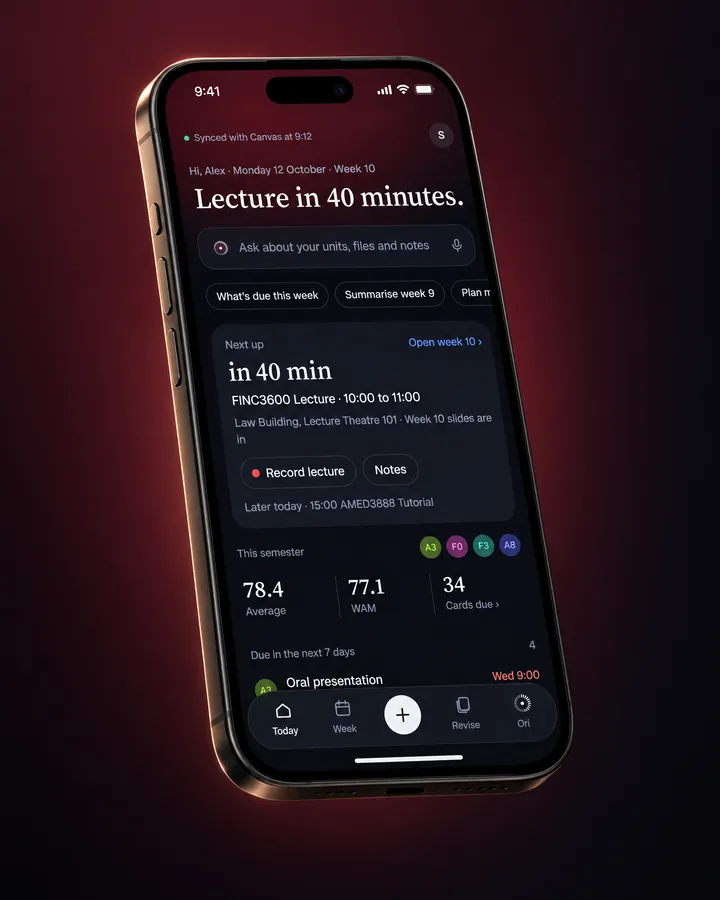
UniOne for iPhone. Coming next.

The phone is for the moments away from your desk: what's next and what's due, a lecture to record, cards on the bus, and a question for Ori. You set UniOne up once on your Mac, and your iPhone pairs with it.

  • Today and the week

    Your next class, what's due and how the semester is going, at a glance.

  • Record a lecture

    Turned into text on the phone itself, then filed under the unit.

  • Cards anywhere

    The same deck as your Mac, with every review counted on both.

Not out yet. It starts as a beta, and this page will say when you can get it.

An iPhone showing UniOne for iPhone's Today screen: Hi, Alex, Monday 12 October, Week 10, then Lecture in 40 minutes, a box to ask about your units, the next class and this semester's marks.
Sample semesterA design preview of the iPhone app.

How your notes get to your phone.

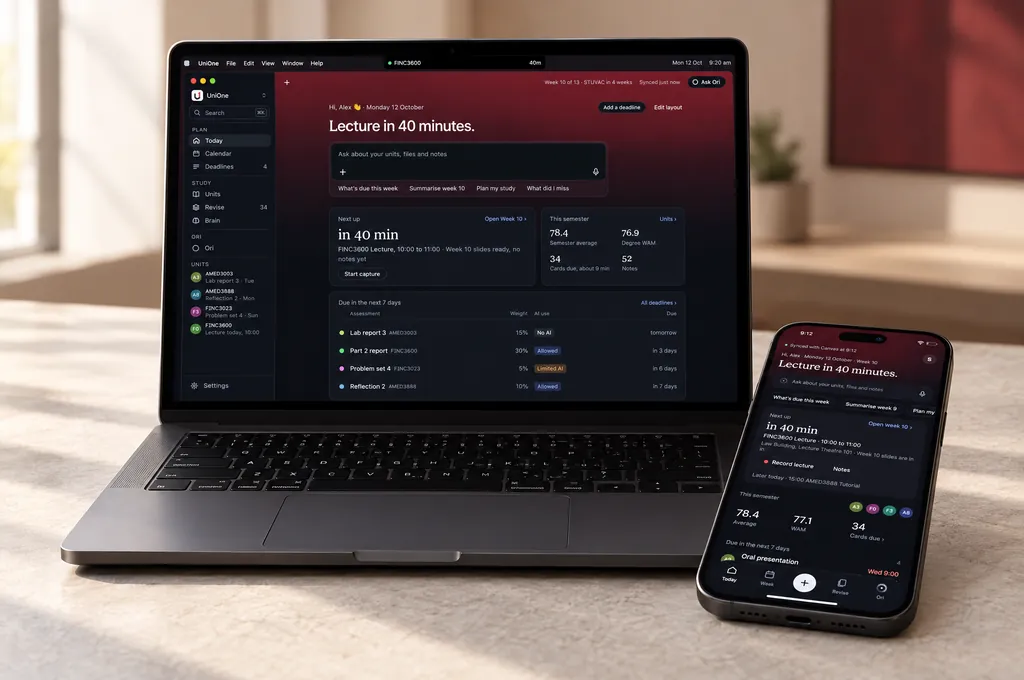
Your notes are files in your UniOne folder. Keep that folder in iCloud Drive or OneDrive, and it carries them between your Mac and your iPhone. UniOne's own server never stores them.

A MacBook and an iPhone side by side on a desk, both showing UniOne's Today page for Alex with Lecture in 40 minutes.
  1. Your MacUniOne writes each note as a file in your folder.
  2. iCloud Drive or OneDriveCopies the folder to your other devices, the way it copies any file.
  3. Your iPhoneOpens the same notes, when UniOne for iPhone arrives.

Sample semesterUsing a uni OneDrive? It is the University's, and usually deleted some time after you graduate, so a personal one or iCloud Drive is safer. How it syncs

Works with what you already use.

Canvas

Your units, deadlines, files, announcements and marks, read with a token you make in your Canvas settings. UniOne only reads.

Your timetable

Your classes, from your university timetable's calendar link, or any calendar you subscribe to. When a class moves, your calendar follows.

Your AI

Ori, Make, cards and rubric checks run on your own Claude, OpenAI, Gemini or Grok key, or on UniOne access if you ask for it. Prefer none? One switch turns every AI feature off.

UniOne is a student project. It is not officially affiliated with, or endorsed by, any university.

Your Canvas token never leaves your laptop.

UniOne talks to Canvas from your Mac, not through a server of ours. Here is everything that moves, and who decides.

Stays on your Mac

Your Mac

  • Your keysYour Canvas token and AI key, in the macOS Keychain.
  • Your notesMarkdown files in a folder you pick, with Ori's projects inside it.
  • Everything else you makeMarks, drafts, cards, chats, Ori's memory and your AI-use log.

Goes where you send it

You decide

  • CanvasRead with your token, straight from your Mac.
  • Your AIOnly when you press Send or a tool, with only what it works on, on your key, to the company you chose.
  • Your timetable linkA plain request for the calendar file at the link you added.
  • A link you paste into OriOnly when you press Paste link: a read of that page's title, author and date.
  • Ori's voiceOnce, by itself, after you sign in: a plain download of the voice. Ori then speaks on your Mac.

Passes through UniOne

Your account

  • Sign inYour email, your name, a hash of your password, when you signed in and which Macs are signed in.
  • UpdatesThis site sees that a copy of UniOne opened and checked for a new version.
  • If you askA message you send the UniOne team from Help. On UniOne access, your AI requests on their way to Anthropic, passed on and never stored.

Your coursework is never kept.

Three steps, about ten minutes.

  1. 1

    Download

    Open the file and drag UniOne to Applications. It is signed and notarised by Apple, so it opens on a double click.

    Apple silicon · macOS 13 or later

  2. 2

    Create your account in the app

    Your name, your email and a password. Use whatever email you want, just not your uni one: uni inboxes block UniOne's emails, so the code never arrives. The password is kept only as a hash, so nobody can read it back, us included.

    We email you a code to confirm it

  3. 3

    Connect your semester

    Canvas, your timetable link and a notes folder. Then pick your AI, or none.

    The setup guide, step by step

Download for Mac

Apple silicon · free

How to set it up

UniOne plays these the first time you open it. Here they are now, so you know what you need before you start.

Make a Canvas token

  1. In Canvas, choose Account, then Settings.
  2. Under Approved Integrations, choose New Access Token.
  3. Type UniOne as the Purpose and pick an expiry up to 90 days away.
  4. Choose Generate Token and copy it. Canvas shows it only once.
  5. Paste it into UniOne and choose Connect.

Copy your timetable link

  1. Sign in to Sydney Timetable with your University account.
  2. Select Subscribe to your timetable.
  3. Copy the calendar link it gives you. It starts with webcal:// or https://.
  4. Paste it into UniOne and choose Connect.

Choose where your notes live

  1. In UniOne, under Where your notes live, pick iCloud Drive, OneDrive or This Mac only.
  2. Choose Choose folder, and pick the same place in your Mac's sidebar.
  3. Make a new folder called UniOne and choose Open, or pick one you already keep notes in. Nothing in it is moved.
  4. UniOne checks the folder and says how it syncs, such as Syncs through iCloud Drive.

Your notes are plain files in that folder. iCloud Drive or OneDrive copies them to your other devices, and UniOne's server never stores them. How it syncs.

Make a Claude key

  1. Sign in at platform.claude.com, or make an account.
  2. In Settings, Billing, buy a little credit. It is pay as you go.
  3. In Settings, API keys, choose Create key and name it UniOne.
  4. Copy the key, which is shown only once, and paste it into UniOne.

Using OpenAI, Gemini or Grok, or no key at all? The setup guide covers each, and how to ask for UniOne access.

The full setup guide, with what to do when something goes wrong.

Questions

Is it free?

Yes. The AI features run on your own key from Claude, OpenAI, Gemini or Grok, which you pay that company for directly. Light use is usually a few dollars a month. No key? Ask for UniOne access in the app, and we may turn it on for you. Everything else costs nothing.

Do I need an AI key?

Only for the AI features: asking Ori about your units and files, Make, drafting cards and checking a draft against its rubric. Today, Calendar, Deadlines, Units, Revise and your notes all work without one, and one switch hides every AI feature.

A key from any one of Claude (platform.claude.com), OpenAI, Gemini or Grok works, and the setup guide shows where to get each. No key? Choose Request access in the app and we can turn on UniOne access for you. A Claude Pro plan does not include API credit; Max and Team plans include some each month.

I forgot my password.

In UniOne, choose Forgot password and enter your email. We email you a 6-digit code from hello@mail.unione.study; enter it and set a new password. The code works for 30 minutes.

If the email does not arrive, check your junk folder and press Resend code. we can still make a one-time reset code by hand: email hello@unione.study. Step by step.

Is this an official university app?

No. UniOne is not officially affiliated with, or endorsed by, any university. It is a student project that reads the same Canvas you already sign in to.

Am I allowed to use AI on my assignment?

Your unit outline decides, for each assessment. UniOne shows the rule it read from the outline on every deadline and turns AI help off where it is not allowed, but the outline is the rule, so check it when in doubt.

Is there a Windows version?

Not yet. UniOne runs on Macs with Apple silicon (M1 or later) and macOS 13 or later.

UniOne for MacFree · iPhone coming soon